Overview
ECI™ Digital Quote Manager™ is sales quote creation and management software. This software consists of two main components: Digital Quote Manager Admin, which administrators use to define various parameters that govern how sales reps can create and adjust sales quotes, and Digital Quote Manager, which sales reps use to create and adjust sales quotes within the specified parameters.
Using Digital Quote Manager Admin, you, the administrator, define parameters that streamline the sales quote generation process for your sale reps and safeguard against potentially costly errors. You use Digital Quote Manager Admin to:
Create product configurations. Within each configuration, you associate the items that can be used with a particular equipment model so that the sales rep selects the right accessory items for the host equipment, group related items into items categories to make them easier for your sales reps to locate, specify minimum and/or maximum quantities of each item that the sales rep can add to a sales quote, indicate when the addition of one item to a sales quote requires the addition and/or exclusion of one or more other items to assist the sales rep with getting the necessary items on the sales quote, indicate if the system can automatically adjust the price and/or cost of an item when a sales rep attempts to adjust margins for a sales quote as a whole, and specify if an accessory item's pricing information is to display on its own row on a sales quote or be rolled up into the host equipment's pricing information.
Create sales teams. You organize your sales reps into teams, and assign to each team the customers for which the team may create sales quotes. When a sales rep uses Digital Quote Manager, the sales rep will be able to create a quote for any customer assigned to the sales rep in e-automate and any customer you assigned to the sales rep's team via Digital Quote Manager Admin.
Manage out costs. While you can use Digital Quote Manager Admin's default out cost group to add a burden cost to the actual cost of each item to protect your margin when calculating a sales rep's commission on the sale of an item, you can also create your own out cost groups, assign items to each out cost group, create out cost codes to override out cost groups for a specified period of time, and assign your sales reps to the out cost codes to change their commission calculations during those time periods.
Manage cost level groups. You can create different groups of items, assign an out cost rate to each group which overrides the out cost for each item in the group, and then assign the cost level groups to your sales representatives for a specific period of item. Since this option allows you to place the same item into multiple groups, this functionality extends the functionality that is available with out cost groups.
Manage leasing terms. While you can assign your sales reps the rights necessary to manually enter lease data into sales quotes, you can also define leasing terms from which your sales reps can select when adding items to a lease on a sales quote via Digital Quote Manager.
Digital Quote Manager Admin works in real-time, meaning your changes are automatically and continuously saved—and instantly apply to the sales quotes your sales reps are creating via Digital Quote Manager. For this reason, best practice is to make sure a product configuration's [Active checkbox is unchecked while you are creating or modifying the configuration via Digital Quote Manager Admin. When you finish making your changes, use Digital Quote Manager Admin's test configuration tool to see how the configuration will appear to your sales reps in Digital Quote Manager. When you are satisfied with your work, check the product configuration's Active checkbox in Digital Quote Manager Admin.
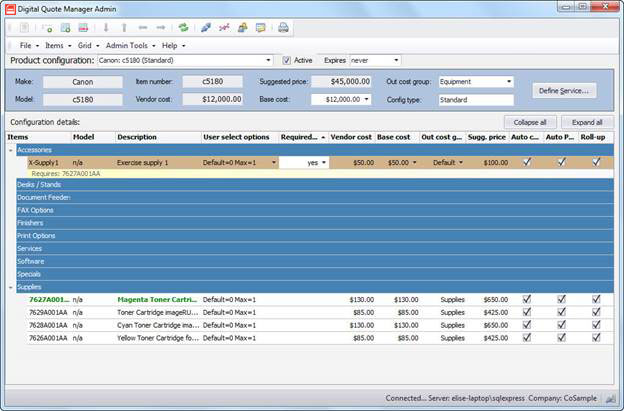
Pictured below is the Digital Quote Manager Admin window. The Digital Quote Manager Admin window consists of the menu, toolbar, host equipment information region, and the configuration details region. You can use the menu or the toolbar to accomplish most functions.
©2026 ECI and the ECI logo are registered trademarks of ECI Software Solutions, Inc. All rights reserved.