Technician Profitability Report
You can process a Technician Profitability report to determine the profitability of your service technicians.
You can run the report for all dates, a preset date range (e.g., Last Fiscal Quarter), or a custom date range. You can also filter the report by customer, equipment, item, and/or technician ranges.
For each technician, the report includes the following information:
Technician's Name
Detail Lines per Service Call:
Line 1: Date, Make/Model, Customer Number, Call Type, Assist Technician (Yes/No), Labor Revenue, Materials Revenue, Travel Revenue, Total Revenue, Labor Cost, Materials Cost, Travel Cost, Total Cost, and Margin Percentage
Line 2: Call Number, Equipment Number, Territory, and Priority
Technician Summary Detail:
Line 1: Total Calls; Labor Revenue, Materials Revenue, Travel Revenue, and Total Revenue Totals; Labor Cost, Materials Cost, Travel Cost, and Total Cost Totals; and Margin Percentage
Line 2: Total Assists; Average Per Call Labor Revenue, Materials Revenue, Travel Revenue, and Total Revenue; Average Per Call Labor Cost, Materials Cost, Travel Cost, Total Cost; and Average Margin Percentage per Call
Getting to the ReportGetting to the Report
Log in to e-automate with appropriate permissions.
Click [Reports] to open the Report Console window.
In the left pane, click Service.
In the right pane, double-click Technician Profitability Report to open the Technician Profitability window.
Setting Report ParametersSetting Report Parameters
When setting report parameters, each parameter you have selected displays in the upper portion of the right pane. The parameters do not reset. The report displays with the parameters that were set the last time you ran the report. You can use the following parameters:
DateDate
To filter by service call completed date, do the following:
In the left pane of the Technician Profitability Report window, select Date to display the Date region in the right pane.
To set a date range, do ONE of the following:
To select a pre-defined date range, use the drop-down menu to select a pre-configured date option (e.g., Last Fiscal Quarter).
To specify a custom date range, do the following:
In the Date region, use the drop-down menu to select <Custom>.
In the From field, enter the beginning date or use the drop-down calendar to select a date.
In the To field, enter the ending date or use the drop-down calendar to select a date.
CustomersCustomers
To filter by customer, do the following:
In the left pane of the Technician Profitability Report window, select Customers to display the Customers region in the right pane.
Do ONE of the following:
If you want to include all customers, in the Customers region, check the Include all Customers checkbox.
If you want to select a range of customers, do the following:
Uncheck the Include all Customers checkbox.
In the From field, enter the beginning customer number or use the lookup icon to select a customer.
In the To field, enter the ending customer number or use the lookup icon to select a customer.
EquipmentEquipment
To filter by equipment, do the following:
In the left pane of the Technician Profitability Report window, select Equipment to display the Equipment region in the right pane.
Do ONE of the following:
If you want to include all equipment, in the Equipment region, check the Include all Equipment checkbox.
If you want to select a range of equipment, do the following:
Uncheck the Include all Equipment checkbox.
In the From field, enter the beginning equipment number or use the lookup icon to select an equipment number.
In the To field, enter the ending equipment number or use the lookup icon to select an equipment number.
ItemsItems
To filter by item, do the following:
In the left pane of the Technician Profitability Report window, select Items to display the Items region in the right pane.
Do ONE of the following:
If you want to include all items, in the Items region, check the Include all Items checkbox.
If you want to select a range of items, do the following:
Uncheck the Include all Items checkbox.
In the From field, enter the beginning item number or use the lookup icon to select an item number.
In the To field, enter the ending item number or use the lookup to select an item number.
TechniciansTechnicians
To filter by technician, do the following:
In the left pane of the Technician Profitability Report window, select Technicians to display the Technicians region in the right pane.
Do ONE of the following:
If you want to include all technicians, in the Technicians region, check the Include all Technicians checkbox.
If you want to select a range of sales reps, do the following:
Uncheck the Include all Technicians checkbox.
In the From field, enter the beginning technician or use the lookup icon to select a technician.
In the To field, enter the ending technician or use the lookup to select a technician.
Processing the ReportProcessing the Report
On the Technician Profitability Report window, click [OK] to process the report.
Understanding Report CalculationsUnderstanding Report Calculations
Following is an excerpt of a Technician Profitability Report, which shows sample service call detail lines and technician summary detail lines based on two service calls. For both service calls, Tech A is the primary technician. For Service Call SC1021, Tech B is the assisting technician.
Note: To jump to a specific calculation, click a number in the sample report image.
Note: This sample report is designed for the sole purpose of illustrating multiple calculation scenarios; it is not intended to represent a realistic or best practices portrayal of technician profitability activity.
Technician Profitability Report Excerpt
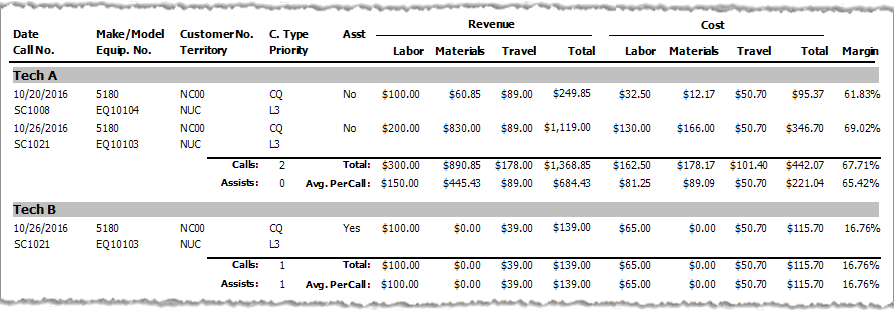
The following table identifies the source of each of the numbers and/or the calculations for arriving at the numbers in this sample report.
|
Report Label |
Calculations |
|
A Yes/No "assisting technician" indicator. A Yes indicates the Assist box is checked on the Service Invoice's View Labor window, indicating the technician assisted on the service call. A No indicates the Assist box is not checked on the Service Invoice's View Labor window, indicating the technician was the primary technician on the service call. |
|
|
The sum of the Labor Revenue for a specific service call a technician completed during the reporting period. If more than one technician is listed per service call (e.g., a primary technician and an assisting technician), labor revenue for the service call is listed under each technician based on the labor records added to the Service Invoice window's Labor tab.
Calculation: Labor Revenue per Service Call = Labor Hours * Labor Rate
Examples: Labor Revenue for SC1008 for Tech A = 1 Labor Hour * $100.00 per Hour Labor Rate = $100.00 |
|
|
The sum of the Materials Revenue for a specific service call a technician completed during the reporting period. If more than one technician is listed per service call (e.g., a primary technician and an assisting technician), all materials revenue for the service call is listed under the primary technician. Materials revenue is revenue from parts, supplies, and other items used on the service call.
Calculation: Materials Revenue per Service Call = Sum of Parts, Supplies, and Other Revenue from materials used on the service call.
Examples: Materials Revenue for SC1008 for Tech A = 1 Wheel * $60.85 Price = $60.85 |
|
|
The sum of the Travel Revenue for a specific service call a technician completed during the reporting period. If more than one technician is listed per service call (e.g., a primary technician and an assisting technician), the base travel revenue is associated with the primary technician only while revenue based on travel hours, travel rate, billable miles, and mileage rate is associated with each tech based on applicable labor records.
Calculation: Travel Revenue per Service Call for Primary Tech = ROUND((ROUND((Travel Base Amount + (Travel Hours * Travel Rate), 2) + ROUND(Billable Miles * Mileage Rate, 2)),2) Travel Revenue per Service Call for Assisting Tech = ROUND((ROUND((Travel Hours * Travel Rate), 2) + ROUND(Billable Miles * Mileage Rate, 2)),2)
Examples: Travel Revenue for SC1008 for Tech A = ROUND((ROUND(($50.00 Travel Base Amount + (0.5 Travel Hours * $65.00 Travel Rate), 2) + ROUND(10 Billable Miles * $0.65 Mileage Rate, 2) = $89.00 |
|
|
The sum of the labor, materials, and travel revenue for a specific service call a technician completed during the reporting period.
Calculation: Total Revenue = Labor Revenue + Materials Revenue + Travel Revenue
Examples: Total Revenue for SC1008 for Tech A = $100.00 Labor Revenue + $60.85 Materials Revenue + $82.50 Travel Revenue = $249.85 |
|
|
The sum of the Labor Costs for a specific service call a technician completed during the reporting period. If more than one technician is listed per service call (e.g., a primary technician and an assisting technician), labor costs for the service call are listed under each technician based on the labor records added to the Service Invoice window's Labor tab. Calculation: Labor Cost = Labor Hours * Tech Burden Rate
Examples: Labor Cost for SC1008 for Tech A = 0.5 Labor Hours * $65.00 Tech Burden Rate = $32.50 |
|
|
The sum of the Materials Costs for a specific service call a technician completed during the reporting period. If more than one technician is listed per service call (e.g., a primary technician and an assisting technician), all materials costs for the service call are listed under the primary technician. Materials costs are costs from parts, supplies, and other items used on the service call. Note: To view the cost of each item on a service call, on the Service Invoice window's Materials tab, click an item to have the system display the View Report Material window. This window lists the item's cost.
Calculation: Materials Costs per Service Call = Sum of Parts, Supplies, and Other Costs from materials used on the service call.
Examples: Materials Costs for SC1008 for Tech A = 1 Wheel * $12.17 Cost = $12.17 |
|
|
The sum of the Travel Costs for a specific service call a technician completed during the reporting period. If more than one technician is listed per service call, travel costs are associated with each technician based on applicable labor records.
Calculation: Travel Cost per Service Call = ROUND(Travel Hours * Travel Rate, 2) + ROUND(Travel Miles * Per Mile Rate, 2) + ROUND(Travel Hours * Tech's Burden Rate, 2)
Example (based on Travel Revenue and Cost sub report image above this table): For SC1008, the service call includes 0.5 travel hours and 10 travel miles. The Options window (Tools > Options), when displaying options for service calls, lists a Travel cost per hour of $30.00 and a per mile cost of $0.32. The Add burden rate to travel cost box is checked, and the tech's Employee record, on the Positions tab, lists a Burden rate of $65.00. For SC1021, the service call includes an additional 0.5 travel hours and 10 travel miles for the assisting tech. The assisting tech also has the same burden rate as the primary technician. Travel Cost for SC1008 for Tech A = ROUND(0.5 Travel Hours * $30.00 Travel Rate, 2) + ROUND(10 Mileage * $0.32 Per Mile Rate, 2) + ROUND(0.5 Travel Hours * $65.00 Tech Burden Rate, 2) = $50.70 |
|
|
The sum of the labor, materials, and travel costs for a specific service call a technician completed during the reporting period.
Calculation: Total Cost = Labor Cost + Materials Cost + Travel Cost
Examples: Total Cost for SC1008 for Tech A = $32.50 Labor Cost + $12.17 Materials Cost + $50.70 Travel Cost = $95.37 |
|
|
The margin percentage for a specific service call a technician completed during the reporting period. Margin Percentage = (Total Revenue - Total Cost) / Total Revenue
Examples: Margin Percentage for SC1008 for Tech A = ($249.85 Total Revenue - $95.37 Total Cost) / $249.85 Total Revenue = 61.83% (rounded to two decimal positions) |
|
|
The total number of service calls a specific technician completed during the reporting period. This number includes both service calls for which the technician was the primary technician and service calls for which the technician was an assisting technician. Tech A completed two service calls during the reporting period, and Tech B completed one service call during the reporting period. |
|
|
The sum of the Labor Revenue for all service calls a technician completed during the reporting period.
Calculation: Total Labor Revenue = SUM(Labor Revenue for all Service Calls a Technician Completed during Reporting Period)
Examples: Total Labor Revenue for Tech A = $100.00 for SC1008 + $200.00 for SC1021 = $300.00 |
|
|
The sum of the Materials Revenue for all service calls a technician completed during the reporting period.
Calculation: Total Materials Revenue = SUM(Materials Revenue for all Service Calls a Technician Completed during Reporting Period)
Examples: Total Materials Revenue for Tech A = $60.85 for SC1008 + $830.00 for SC1021 = $890.85 |
|
|
The sum of the Travel Revenue for all service calls a technician completed during the reporting period.
Calculation: Total Travel Revenue = SUM(Travel Revenue for all Service Calls a Technician Completed during Reporting Period)
Examples: Total Travel Revenue for Tech A = $89.00 for SC1008 + $89.00 for SC1021 = $178.00 |
|
|
The sum of the Total Revenue for all service calls a technician completed during the reporting period.
Calculation: Total Total Revenue = SUM(Total Revenue for all Service Calls a Technician Completed during Reporting Period)
Examples: Total Total Revenue for Tech A = $249.85 for SC1008 + $1,119.00 for SC1021 = $1,368.85 |
|
|
The sum of the Labor Costs for all service calls a technician completed during the reporting period.
Calculation: Total Labor Cost = SUM(Labor Costs for all Service Calls a Technician Completed during Reporting Period)
Examples: Total Labor Cost for Tech A = $32.50 for SC1008 + $130.00 for SC1021 = $162.50 |
|
|
The sum of the Materials Costs for all service calls a technician completed during the reporting period.
Calculation: Total Materials Cost = SUM(Materials Costs for all Service Calls a Technician Completed during Reporting Period)
Examples: Total Materials Cost for Tech A = $12.17 for SC1008 + $166.00 for SC1021 = $178.17 |
|
|
The sum of the Travel Costs for all service calls a technician completed during the reporting period.
Calculation: Total Travel Cost = SUM(Travel Revenue for all Service Calls a Technician Completed during Reporting Period)
Examples: Total Travel Cost for Tech A = $50.70 for SC1008 + $50.70 for SC1021 = $101.40 |
|
|
The sum of the Total Costs for all service calls a technician completed during the reporting period.
Calculation: Total Total Cost = SUM(Total Costs for all Service Calls a Technician Completed during Reporting Period)
Examples: Total Total Cost or Tech A = $95.37 for SC1008 + $346.70 for SC1021 = $442.07 |
|
|
The margin percentage for all service calls a technician completed during the reporting period. Margin Percentage = (Total Total Revenue - Total Total Cost) / Total Total Revenue
Examples: Total Margin Percentage for Tech A = ($1,368.85 Total Total Revenue - $442.07 Total Total Cost) / $1,368.85 Total Total Revenue = 67.71% (rounded to two decimal positions) |
|
|
The total number of calls a technician completed during the reporting period for which the technician was an assisting technician. Tech A was not an assisting technician on the calls Tech A completed during the reporting period, and Tech B was an assisting technician on one service call during the reporting period. |
|
|
The Average Labor Revenue per Service Call a technician completed during the reporting period.
Calculation: Avg. Per Call Labor Revenue = Total Labor Revenue per Technician / Calls per Technician
Examples: Avg. Per Call Labor Revenue for Tech A = $300.00 Total Labor Revenue / 2 Calls = $150.00 |
|
|
The Average Materials Revenue per Service Call a technician completed during the reporting period.
Calculation: Avg. Per Call Materials Revenue = Total Materials Revenue per Technician / Calls per Technician
Examples: Avg. Per Call Materials Revenue for Tech A = $890.85 Total Materials Revenue / 2 Calls = $445.43 (rounded to two decimal positions) |
|
|
The Average Travel Revenue per Service Call a technician completed during the reporting period.
Calculation: Avg. Per Call Travel Revenue = Total Travel Revenue per Technician / Calls per Technician
Examples: Avg. Per Call Travel Revenue for Tech A = $178.00 Total Travel Revenue / 2 Calls = $89.00 |
|
|
The Average Total Revenue per Service Call a technician completed during the reporting period.
Calculation: Avg. Per Call Total Total Revenue = Total Total Revenue per Technician / Calls per Technician
Examples: Avg. Per Call Total Total Revenue for Tech A = $1,368.85 Total Total Revenue/ 2 Calls = $684.43 (rounded to two decimal positions) |
|
|
The Average Labor Cost per Service Call a technician completed during the reporting period.
Calculation: Avg. Per Call Labor Cost = Total Labor Cost per Technician / Calls per Technician
Examples: Avg. Per Call Labor Cost for Tech A = $162.50 Total Labor Cost / 2 Calls = $81.25 |
|
|
The Average Materials Cost per Service Call a technician completed during the reporting period.
Calculation: Avg. Per Call Materials Cost = Total Materials Cost per Technician / Calls per Technician
Examples: Avg. Per Call Materials Cost for Tech A = $178.17 Total Materials Cost / 2 Calls = $89.09 (rounded to two decimal positions) |
|
|
The Average Travel Cost per Service Call a technician completed during the reporting period.
Calculation: Avg. Per Call Travel Cost = Total Travel Cost per Technician / Calls per Technician
Examples: Avg. Per Call Travel Cost for Tech A = $101.40 Total Travel Cost / 2 Calls = $50.70 |
|
|
The Average Total Total Cost per Service Call a technician completed during the reporting period.
Calculation: Avg. Per Call Total Total Cost = Total Total Cost per Technician / Calls per Technician
Examples: Avg. Per Call Total Total Cost for Tech A = $442.07 Total Total Cost / 2 Calls = $221.04 (rounded to two decimal positions) |
|
|
The Average Margin Percentage per Service Call a technician completed during the reporting period. Avg. Per Call Margin Percentage = Sum(Margin Percentage) / Calls per Technician
Examples: Total Margin Percentage for Tech A = (61.83 Margin Percentage for SC1008 + 69.02 Margin Percentage for SC1021 / 2 Calls = 67.71% |
Non-supported ReleaseNon-supported Release
©2022 ECI and the ECI logo are registered trademarks of ECI Software Solutions, Inc. All rights reserved.