Release Notes (17.1)
17.1 is our Customer Relationship Management product portfolio release. This release is primarily focused on new solutions designed to enhance the sales and customer management capabilities within e-automate. In addition to introducing new solutions, 17.1 has a strong emphasis on quality and includes defects that have been resolved throughout the system.
E-automate 17.1
Release FeaturesRelease Features
This release added the following new solutions:
B-32975: As an account manager, I want to be alerted when entering and editing a duplicate contact in order to minimize the confusion when a contact record is created twice, while maintaining the ability to use a group email address for contacts fulfilling multiple roles.B-32975: As an account manager, I want to be alerted when entering and editing a duplicate contact in order to minimize the confusion when a contact record is created twice, while maintaining the ability to use a group email address for contacts fulfilling multiple roles.
To minimize the possibility of creating duplicate contacts, the system now displays duplicate contact warning information when:
Two or more contacts have the same Last name and Email
Two or more contacts have the same Phone1 and Email
The warning information will appear if you attempt to add a new contact that appears to be a duplicate of an existing contact or if you edit a contact in a manner that makes it appear to be a duplicate.
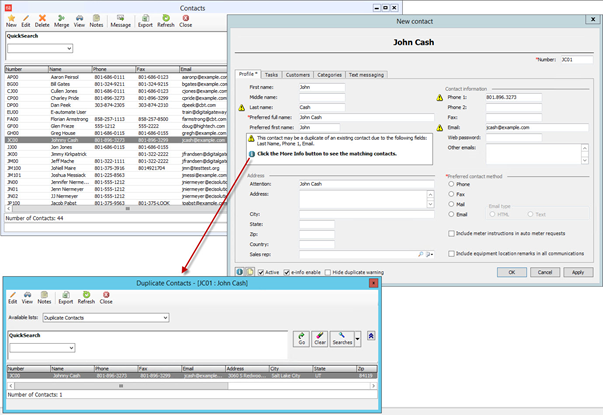
The information in the warning message includes:
The fields (Last name, Phone 1 and/or Email) that are duplicated in existing Contact records
A More info icon that when clicked, allows users to view the potential duplicates of the current contact
The duplicate contact warning message has also been added to the CM Contact Utility Spreadsheet (CMContactUtils.xls) as well as the New Contact and Edit Contact windows from within a Service call, Contract, Customer or Equipment Record.
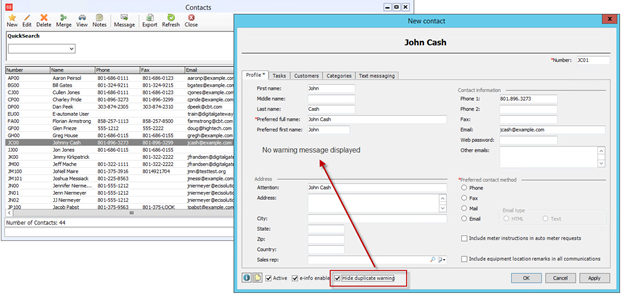
A ‘Hide duplicate warning’ checkbox was also added to the New Contact and Edit Contact windows. This box can be checked if a user does not want the system to consider this contact a duplicate contact. Once checked, the warning message and all warning icons will disappear, and the contact will no longer show in the QuickSearch filters for Duplicate Email-Last Name and Duplicate Email-Phone.
B-32973: As an account manager, I want to see any suspect contact records that may be a duplicate so that I can identify and resolve any potential duplicate contacts that already exist in my system.B-32973: As an account manager, I want to see any suspect contact records that may be a duplicate so that I can identify and resolve any potential duplicate contacts that already exist in my system.
Three options have been added to assist users in identifying duplicate contacts:
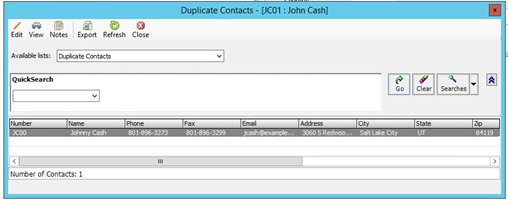
The Duplicate Contacts window, accessed from the New Contact or Edit Contract window’s More info icon within the warning message
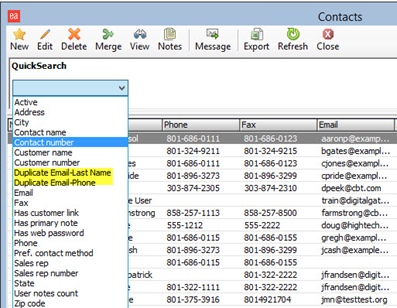
QuickSearch option for Duplicate Email-Last Name in the Contacts list window
QuickSearch option for Duplicate Email-Phone in the Contacts list window
B-33608: As an accounts receivable clerk, I want to be able to look up contacts and apply the same filters consistently so that I can easily identify the correct contact.B-33608: As an accounts receivable clerk, I want to be able to look up contacts and apply the same filters consistently so that I can easily identify the correct contact.
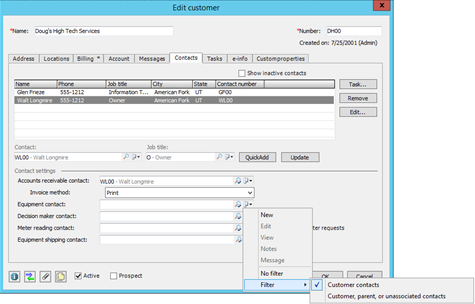
New filters were added to the Contact lookups within the Customer record:
Customer contacts
Show contacts associated with the customer you are creating/editing.
Customer, parent, or unassociated contacts
Show contacts associated with the customer or the parent customer you are creating/editing. This filter also includes contacts that do not have a customer association.
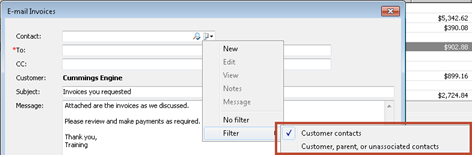
The same filter options as above are also now available in the Accounts Receivable Console in the:
Email invoice
Email statement
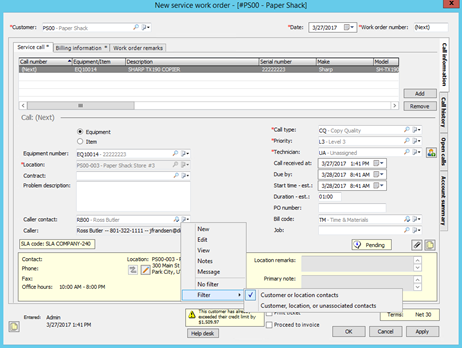
New filters were also added to the Caller contact lookup on the Service work order:
No filter
Show all contacts regardless of customer association
Customer or location contacts
Show contacts associated with the customer in the Customer field
Show contacts associated with the location in the Location field
Customer, location, or unassociated contacts
Show contacts associated with the customer or the location customer. This filter also includes contacts that do not have a customer association.
B-29254: As an order processor, I want the ability to include previously shipped items on a packing list so that the customer does not call with questions about items they think might be missing from their order.B-29254: As an order processor, I want the ability to include previously shipped items on a packing list so that the customer does not call with questions about items they think might be missing from their order.
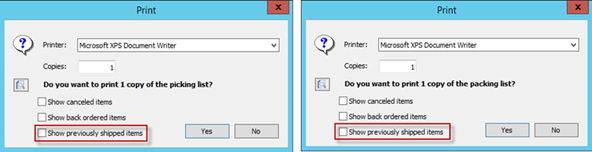
An option has now been added to allow users to include or exclude previously shipped items on both the picking and packing lists.
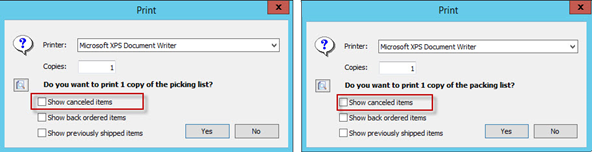
B-29439: As an order processor, I want the ability to include cancelled items on packing list so that the customer does not call with questions about items they think might be missing from their order.B-29439: As an order processor, I want the ability to include cancelled items on packing list so that the customer does not call with questions about items they think might be missing from their order.
An option has now been added to allow users to include or exclude cancelled items on both the picking and packing lists.
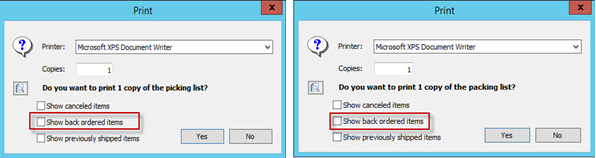
B-29443: As an order processor, I want the ability to hide backordered items on a packing list so that the customer does not call with questions about items they think might be missing from their order.B-29443: As an order processor, I want the ability to hide backordered items on a packing list so that the customer does not call with questions about items they think might be missing from their order.
An option has now been added to allow users to include or exclude backordered items on both the picking and packing lists.
The above options are also available, under the Miscellaneous Options filter, if printing the following reports from the Reports console:
Packing List
Sales Order Packing List
Sales Order Quick Picking List
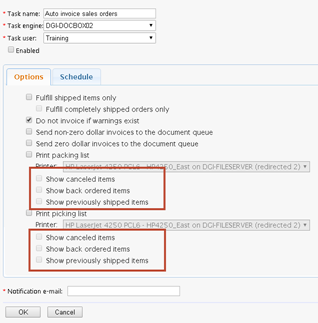
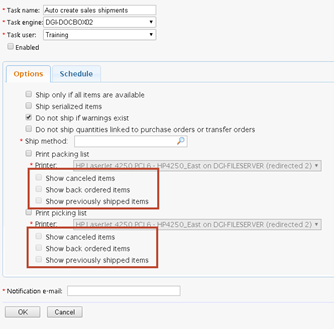
Additionally, the above discussed options have been added to following e-agent tasks:
Auto invoice sales orders
Auto create sales shipments
B-29438: As a warehouse picker, I only want to see those items on the picking list that I need to pull so that I do not inadvertently ship something that has been cancelled, on backorder or previously shipped.B-29438: As a warehouse picker, I only want to see those items on the picking list that I need to pull so that I do not inadvertently ship something that has been cancelled, on backorder or previously shipped.
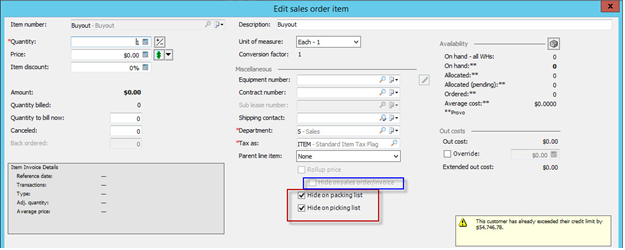
On the Sales order a new option has been added to the item detail window to allow items to be hidden on the packing list or picking list or both. By default, both hidden options will be checked if the item added to the order is a non-stock item that has no inventory code or an item that has an expense code. When items are hidden from within the Sales order item level, the options chosen at this level override any option chosen at the print window.
Additionally a change was made to what was previously the ‘Hide when printed’ checkbox. The new checkbox option is ‘Hide on sales order/invoice’ to clearly identify where the item would be hidden when checked.
B-18434: As an AP clerk, I want the ability to automatically post my recurring AP invoices so that I can use the time that was needed to manually post for other AP responsibilities.B-18434: As an AP clerk, I want the ability to automatically post my recurring AP invoices so that I can use the time that was needed to manually post for other AP responsibilities.
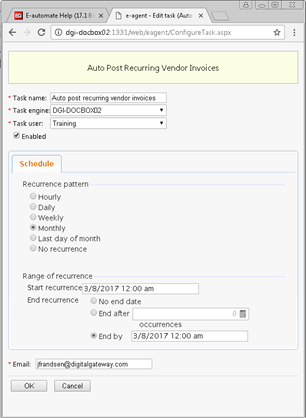
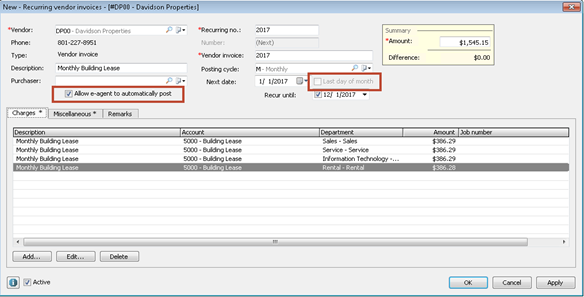
A new e-agent task, Auto Post Recurring Vendor Invoices, has been added to allow users to automatically post their recurring AP invoices. Last day of the month support was also added to this e-agent task as well as to the New Recurring vendor invoices window.
B-33660: As an order processor, I want to know when placing an order that the customer (equipment) may not be ready for a new consumable or the quantity being ordered is over and above what might be needed, so that I can adjust the order as needed or research why the customer (equipment) would need the consumables earlier than expected.B-33660: As an order processor, I want to know when placing an order that the customer (equipment) may not be ready for a new consumable or the quantity being ordered is over and above what might be needed, so that I can adjust the order as needed or research why the customer (equipment) would need the consumables earlier than expected.
Users are now able to configure e-automate to display item yield warning messages on sales transactions when the minimum expected yield for a consumable is not met. When an equipment is linked to a sales order for a consumable item, the system will perform a calculation based on the below and determine if the Usage is less than or greater than the minimum expected value (yield):
Copy yield or yield override of the consumable item
The linked equipment’s install date and installed location
Yield percentage
This is a new system option under Tools > Sales where users can input the acceptable percentage of a consumable item’s copy yield that must be reached to prevent the system from displaying an item yield warning when a user adds the consumable item to a sales transaction. If 0 is entered then the item yield warning will be disabled.
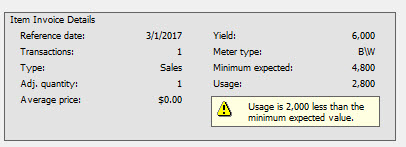
Reference date
This date is the most recent transaction date on which a positive net quantity of the consumable item being linked to the equipment on this order was previously linked to the equipment on an invoiced sales transaction and/or service call.
Usage
If valid meter reads are available on the Reference Date and the date of this sales transaction, the system will use those reads to calculate actual usage.
If valid meters reads are not available on both dates, the system will use the applicable monthly average (3 Mo., 6 Mo., or 12 Mo) to determine the daily average for that meter and then multiples that daily average by the number of days between the Reference Date and date of this sales transaction.
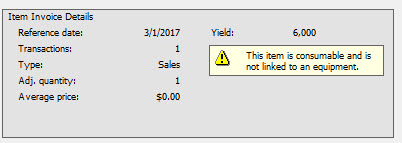
If the Usage is less than the minimum expected value, an Item yield warning message will display on the line item on the sales transaction and the Item Invoice Details summary will be updated on the Sales order item detail:
The Item yield warning will also display if a consumable is being ordered but there is not an equipment being linked to the sales transaction. The Item Invoice Details summary will not have usage calculated and will display the below message:
Users can also enable the Item Yield warning in e-Info through the Customer Gateway Configuration.
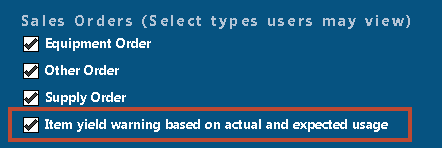
When enabled, e-info uses the same logic as e-automate and does not restrict the customer from submitting the order/quote. It will display an indicator on the order “We will review consumable items on your order based on expected and actual usage.” And it will encourage customers to “Please enter order comments to help us understand your request.” For e-info mobile, it will show the order is going to be reviewed based on actual and expected usage but does not display the suggestion to enter order comments.
B-19507: As an e-automate user, I would like to see consistent branding in e-automate and all add on products.B-19507: As an e-automate user, I would like to see consistent branding in e-automate and all add on products.
Through e-automate version 16.1, e-automate and all add on products have been branded Digital Gateway. The 17.1 release represents a branding change from Digital Gateway to our new ECI e-automate branding.
Users will notice the new branding in the following areas within the products:
Windows

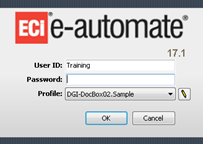
Login screens
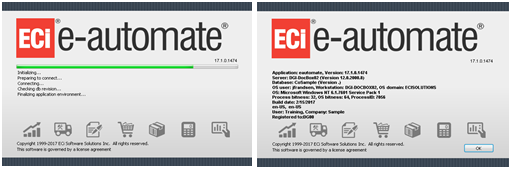
Launch and About windows
E-05796: As a service manager, I would like to be able to create a ticket in Naverisk and have that ticket import into e-automate as a Service call so that the tickets can be reviewed from within e-automate.E-05796: As a service manager, I would like to be able to create a ticket in Naverisk and have that ticket import into e-automate as a Service call so that the tickets can be reviewed from within e-automate.
A two-way integration has been created between Naverisk and e-automate. Once the configuration between the two systems has been validated, fields from e-automate are available for selection on a ticket within Naverisk. These fields include:
Customer
Call Type
Technician
Problem Code
Contact
Call status
Resolution
Priority
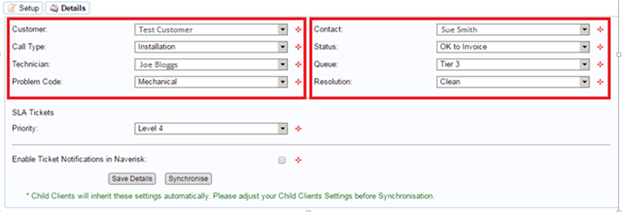
After a ticket has been created in Naverisk, that ticket will then be imported into e-automate as a new Service call. When the ticket is closed within Naverisk, a call note is added to the corresponding Service call in e-automate.
EnhancementsEnhancements
This release added the following enhancements to existing functionality:
B-33427: As an account manager, I would like to see multiple titles associated with a customer contact within the AR Console without having to drill down to the tab on the contact record detail screen, so that I know which of the contacts to email invoices and/or statements to and ensure that duplicate contacts are not added for someone fulfilling multiple titles/roles.B-33427: As an account manager, I would like to see multiple titles associated with a customer contact within the AR Console without having to drill down to the tab on the contact record detail screen, so that I know which of the contacts to email invoices and/or statements to and ensure that duplicate contacts are not added for someone fulfilling multiple titles/roles.
A new column ‘Contact’s job title’ was added to the customer list window in the Accounts receivable console. If a contact has more than one job title, the job titles are concatenated and displayed alphabetically.

B-28390: As an account manager, I only want to see active contacts on the customer contact tab within the AR Console so that I have inactive contacts for historical references referring to who was the prior AR contact.B-28390: As an account manager, I only want to see active contacts on the customer contact tab within the AR Console so that I have inactive contacts for historical references referring to who was the prior AR contact.
A new checkbox ‘Show inactive contacts’ was added to the Contacts tab on the Customer record. When checked, any contacts associated with the customer that are inactive will display.\
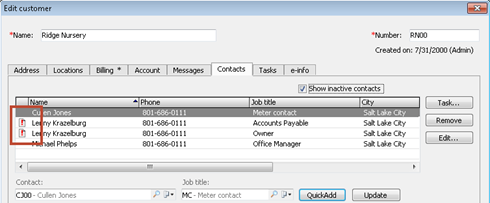
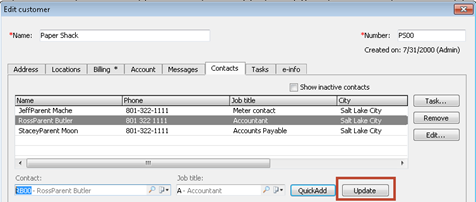
B-28385: As an account manager, I want to edit the contacts job title so that I can easily update the title field without deleting and re-entering the contact record.B-28385: As an account manager, I want to edit the contacts job title so that I can easily update the title field without deleting and re-entering the contact record.
An Update button was added to the Contacts tab on the Customer record to allow an existing Contact’s job title to be updated.
B-29772: As a service manager, I want report help to include how calculations are determined for the Model Profitability report to understand how numbers and statistics are being reported so that I can double check calculations and use the reports accurately to make service decisions.B-29772: As a service manager, I want report help to include how calculations are determined for the Model Profitability report to understand how numbers and statistics are being reported so that I can double check calculations and use the reports accurately to make service decisions.
In the 17.1 e-automate Help, users can now go to Home > E-automate > Service Contracts > Functional > Reports > Model Profitability and access a new section entitled “Understanding Report Calculations”. This section provides detailed report examples and calculation breakdowns to help users understand what is being reported and how it was calculated.
D-29770: As a service manager, I want report help to include how calculations are determined for the Contract Profitability report to understand how numbers and statistics are being reported so that I can double check calculations and use the reports accurately to make service decisions.D-29770: As a service manager, I want report help to include how calculations are determined for the Contract Profitability report to understand how numbers and statistics are being reported so that I can double check calculations and use the reports accurately to make service decisions.
In the 17.1 e-automate Help, users can now go to Home > E-automate > Service Contracts > Functional > Reports > Contract Profitability and access a new section entitled “Understanding Report Calculations”. This section provides detailed report examples and calculation breakdowns to help users understand what is being reported and how it was calculated.
B-17899: As a service manager, I want report help to include how calculations are determined for the Technician Profitability report to understand how numbers and statistics are being reported so that I can double check calculations and use the reports accurately to make service decisions.B-17899: As a service manager, I want report help to include how calculations are determined for the Technician Profitability report to understand how numbers and statistics are being reported so that I can double check calculations and use the reports accurately to make service decisions.
In the 17.1 e-automate Help, users can now go to Home > E-automate > Service Contracts > Functional > Reports > Technician Profitability and access a new section entitled “Understanding Report Calculations”. This section provides detailed report examples and calculation breakdowns to help users understand what is being reported and how it was calculated.
D-29771: As a service manager, I want report help to include how calculations are determined for the Service Statistics report to understand how numbers and statistics are being reported so that I can double check calculations and use the reports accurately to make service decisions.D-29771: As a service manager, I want report help to include how calculations are determined for the Service Statistics report to understand how numbers and statistics are being reported so that I can double check calculations and use the reports accurately to make service decisions.
In the 17.1 e-automate Help, users can now go to Home > E-automate > Service Contracts > Functional > Reports > Service Statistics and access a new section entitled “Understanding Report Calculations”. This section provides detailed report examples and calculation breakdowns to help users understand what is being reported and how it was calculated.
B-29774: As a service manager, I want report help to include how calculations are determined for the Service Activity Report by Technician to understand how numbers and statistics are being reported so that I can double check calculations and use the reports accurately to make service decisions.B-29774: As a service manager, I want report help to include how calculations are determined for the Service Activity Report by Technician to understand how numbers and statistics are being reported so that I can double check calculations and use the reports accurately to make service decisions.
In the 17.1 e-automate Help, users can now go to Home > E-automate > Service Contracts > Functional > Reports > Service Activity Report by Technician and access a new section entitled “Understanding Report Calculations”. This section provides detailed report examples and calculation breakdowns to help users understand what is being reported and how it was calculated.
B-29773: As a service manager, I want report help to include how calculations are determined for the Service Activity Report by Model to understand how numbers and statistics are being reported so that I can double check calculations and use the reports accurately to make service decisions.B-29773: As a service manager, I want report help to include how calculations are determined for the Service Activity Report by Model to understand how numbers and statistics are being reported so that I can double check calculations and use the reports accurately to make service decisions.
In the 17.1 e-automate Help, users can now go to Home > E-automate > Service Contracts > Functional > Reports > Service Activity Report by Model and access a new section entitled “Understanding Report Calculations”. This section provides detailed report examples and calculation breakdowns to help users understand what is being reported and how it was calculated.
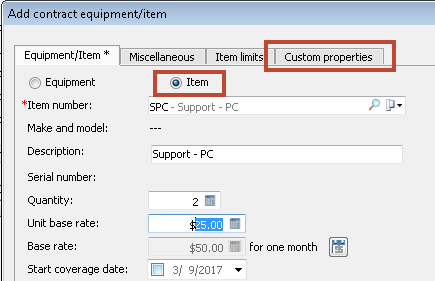
B-19706: As a contract administrator, I would like to be able to store additional information at the Contract equipment/item detail level so that I do not have to go outside of the contract to find it.B-19706: As a contract administrator, I would like to be able to store additional information at the Contract equipment/item detail level so that I do not have to go outside of the contract to find it.
Custom properties on Contract equipment/item details is now available. The custom property is available for both Equipment and Serviceable Items.
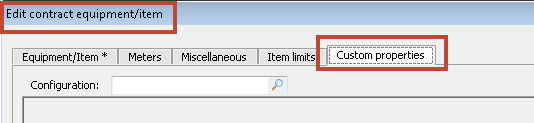
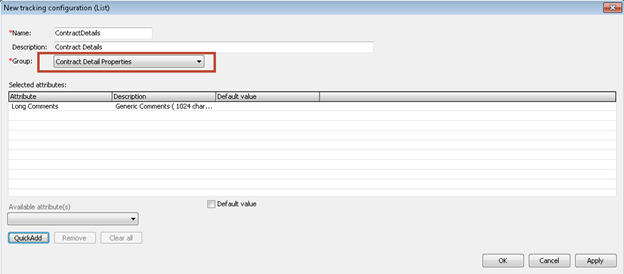
A new group called Contract Detail Properties has been added for selection when creating a new tracking configuration to be used with the Custom property.
B-33313: As an account manager, I want to be able to import additional key fields into my customer records so that I do not have to manually input the information.B-33313: As an account manager, I want to be able to import additional key fields into my customer records so that I do not have to manually input the information.
The following columns have been added to the ARCustomers tab in the DataImportExport.xls and can now be imported into the e-automate customer record:
StandardName: Time zone
Charge method: Credit Card/ACH or Credit on Account
EnableCustomPricing: Enable customer pricing
InheritParentCustomPrices: Inherit Parent customer prices
ARRep: AR rep
TrackingConfigName: Custom properties tracking configuration
B-27193: As an accounts receivable clerk, I would like to determine the Method to record customer payments when I am using the AR Post Payments utility.B-27193: As an accounts receivable clerk, I would like to determine the Method to record customer payments when I am using the AR Post Payments utility.
Method has been added to the header information (blue box) of the utility. When the Method is populated any transaction being posted in the utility will append the Method functionality in the same way the drop down does in the e-automate UI for Recording a new customer payment.
B-27194: As an accounts receivable clerk, I would like to be able to tell the difference between a warning and an error when validating a batch of payments using the AR Post Payment Utility, so that I know which lines I need to correct in order to successfully post.B-27194: As an accounts receivable clerk, I would like to be able to tell the difference between a warning and an error when validating a batch of payments using the AR Post Payment Utility, so that I know which lines I need to correct in order to successfully post.
To help identify which of the lines contain actual errors and which lines contain warnings, any line entry that contains an error will show a message in the Message column that begins with the word “ERROR”. Warnings will continue to display in the Message column as normal.
B-27192: As an accounts receivable clerk, I would like to be notified of available Credit memos and Unapplied payments so that when the applied amount and check amount sum is less than the total remaining balance of an invoice, I can make the decision to apply additional payments or Credit memos.B-27192: As an accounts receivable clerk, I would like to be notified of available Credit memos and Unapplied payments so that when the applied amount and check amount sum is less than the total remaining balance of an invoice, I can make the decision to apply additional payments or Credit memos.
Previously, available invoices would be noted in the Message column when an unapplied payment was being validated. Now when validating, the Message column will also display available Credit memos and Unapplied payments.
B-27191: As an accounts receivable clerk, I would like a different Messages to appear after I select the Post option, so there is an added level of visibility to the action about to be taken.B-27191: As an accounts receivable clerk, I would like a different Messages to appear after I select the Post option, so there is an added level of visibility to the action about to be taken.
Now when the Post option is selected, users will see a new message that reads “Warning: you are about to post this worksheet. Continue?”
FixesFixes
This release addresses the following issues:
D-09810: When running the Contact Management by Rep report, the drop down menu for selecting specific sales reps is showing many duplicates.D-09810: When running the Contact Management by Rep report, the drop down menu for selecting specific sales reps is showing many duplicates.
Previously the report was listing the sales rep one time each for each contact they are the sales rep for, plus one time as a general sales rep. This selection has resolved so that the sales rep just shows once.
D-17440: The Packing list created during a Sales order fulfillment is sorting items by character ascent order instead of numeric.D-17440: The Packing list created during a Sales order fulfillment is sorting items by character ascent order instead of numeric.
The sorting has been corrected so it now sorts items numerically.
D-18583: In Tools > Transaction history, if a user clicks on a Service invoice transaction, the View service call window that opens is for a call not associated with the invoice.D-18583: In Tools > Transaction history, if a user clicks on a Service invoice transaction, the View service call window that opens is for a call not associated with the invoice.
This issue has been fixed and the correct associated call for the specified invoice transaction is displayed.
D-18585: The Printed Date on the Sales order packing list is trying to display the time underneath the date but it does not display fully.D-18585: The Printed Date on the Sales order packing list is trying to display the time underneath the date but it does not display fully.
This issue has been resolved and now the time is displayed and readable.
D-20559: An error occurs when trying to use an advanced filter for Categories on the Historical sales report.D-20559: An error occurs when trying to use an advanced filter for Categories on the Historical sales report.
This issue has been resolved and an advanced filter can be used for Categories.
D-21600: On a Sales order when using the single use account, if the charge method is set to credit card/ACH and the ‘Auth on OK’ option is not checked, the charge does not appear in the ‘Process customer charge accounts’ and the payment never gets created.D-21600: On a Sales order when using the single use account, if the charge method is set to credit card/ACH and the ‘Auth on OK’ option is not checked, the charge does not appear in the ‘Process customer charge accounts’ and the payment never gets created.
If the ‘Auth on OK’ option is not checked, when fulfilling the Sales order, the Single use charge account window will open so a preauthorization of the charge is created. After fulfilling the sales order, users can go to Accounting > Accounts receivable > Process customer charge accounts to create the payment.
D-21744: When running the Model Profitability and Contract Profitability, if the Misc. filters are set to not show model details (Model Profitability) or contract details (Contract Profitability) will still show on the report.D-21744: When running the Model Profitability and Contract Profitability, if the Misc. filters are set to not show model details (Model Profitability) or contract details (Contract Profitability) will still show on the report.
The filter behavior has been corrected so that if the model or contract details are not selected they will not show on the respective reports.
D-21815: A contract has a piece of equipment that was ended, billed and then re-added back to the contract at a later date and the contract was billed through its expiration date. If the contract is renewed with the same piece of equipment, the beginning meter reading of the equipment is using the ending read from the first instance of the equipment on the previous revision of the contract.D-21815: A contract has a piece of equipment that was ended, billed and then re-added back to the contract at a later date and the contract was billed through its expiration date. If the contract is renewed with the same piece of equipment, the beginning meter reading of the equipment is using the ending read from the first instance of the equipment on the previous revision of the contract.
In the scenario above, the beginning meter reading for the re-added piece of equipment has been fixed and will no longer use the ending read from the first contract instance prior to renewal.
D-24998: When creating a Sales Order, if you are setting up Parent/Child relationships with the line items, the system will organize those items in the list according to the linked listed items (i.e. 1, 1.1, 1.2, 1.3, 2) but when you print the order the system will list the items according to the order they were added to the Sales Order (i.e. 1, 2, 1.1., 1.3, 1.2).D-24998: When creating a Sales Order, if you are setting up Parent/Child relationships with the line items, the system will organize those items in the list according to the linked listed items (i.e. 1, 1.1, 1.2, 1.3, 2) but when you print the order the system will list the items according to the order they were added to the Sales Order (i.e. 1, 2, 1.1., 1.3, 1.2).
The print order has been corrected so that it matches the line item order.
D-25161: If the Budget Comparative Income Statement shows a negative variance dollar amount, the corresponding variance percentage is shown as a positive percentage.D-25161: If the Budget Comparative Income Statement shows a negative variance dollar amount, the corresponding variance percentage is shown as a positive percentage.
The variance percentage was displaying the correct amount but in a negative percentage instead of a positive percentage. This behavior has been corrected so the variance amounts and percentages are in line.
D-26330: If the equipment filter on the Model Profitability report is set to a specific equipment, the report still runs for all equipment.D-26330: If the equipment filter on the Model Profitability report is set to a specific equipment, the report still runs for all equipment.
The equipment filter has been fixed so that if a specific equipment is chosen, the report will return results for only that piece of equipment and not all equipment.
D-26555: In e-agent, if a user has added an additional QuickSearch filter and that filter contains white space/leading space, the filter is not properly accounting for that.D-26555: In e-agent, if a user has added an additional QuickSearch filter and that filter contains white space/leading space, the filter is not properly accounting for that.
The white space/leading space has been filtered out of the task filters.
D-26672: In the ARPostPayments Utility, when attempting to use one check to pay for multiple invoices for multiple customers (multiple Bill to’s) an error message is displayed when trying to validate.D-26672: In the ARPostPayments Utility, when attempting to use one check to pay for multiple invoices for multiple customers (multiple Bill to’s) an error message is displayed when trying to validate.
The validation error has been corrected and payments by check can now be applied to a variety of Bill To customers in the utility.
D-26675: In the ARPostPayments Utility there are two locations where Description is used and it is confusing to users which Description is related to a specific check.D-26675: In the ARPostPayments Utility there are two locations where Description is used and it is confusing to users which Description is related to a specific check.
The column header ‘Description’ has been changed to ‘Check Description’ to clarify that the column header content is related to the check and not the actions of the row.
D-26968: In the ARPostPayments Utility, when validating an entry for an Invoice that has already been paid the only place that gives any indication that the invoice may have been paid is in the Discrepancy column.D-26968: In the ARPostPayments Utility, when validating an entry for an Invoice that has already been paid the only place that gives any indication that the invoice may have been paid is in the Discrepancy column.
If an Invoice has already been paid or voided and a user attempts to post a payment for it the message “The selected invoice may either have no remaining balance or may have been voided’ will display in the Message column. Additionally, a message was added to alert users when the applied amount is greater than the due amount on the Invoice.
D-27178: If a user ships a Sales order, leaves the New shipment dialog and opens another session of e-automate and attempts to ship the same order, a message appears saying the order is in use but if the OK button is clicked the shipment stays open.D-27178: If a user ships a Sales order, leaves the New shipment dialog and opens another session of e-automate and attempts to ship the same order, a message appears saying the order is in use but if the OK button is clicked the shipment stays open.
This issue has been resolved and the same shipment will not be able to be open in two e-automate sessions.
D-27727: When running the RMA Orders report from the Report console, if an Advanced filter is used a ‘Database Connector Error’ occurs.D-27727: When running the RMA Orders report from the Report console, if an Advanced filter is used a ‘Database Connector Error’ occurs.
This issue has been resolved and an advanced filter can be used for RMA Orders when running the report form the Report console.
D-27975: When auto invoicing service calls using the Auto Invoice Service Calls e-agent task if the service call has an equipment location customer that is not a child of the contract customer, the call will not auto invoice due to a warning message.D-27975: When auto invoicing service calls using the Auto Invoice Service Calls e-agent task if the service call has an equipment location customer that is not a child of the contract customer, the call will not auto invoice due to a warning message.
An option was added so that a Service call that has an Equipment location customer that is not a Child of the Contract customer can be auto invoiced. The option allows e-agent to bypass the warning message and proceed with invoicing.
D-29249: In e-agent, if multiple task engines are installed, users cannot make changes to the long or short files for the Test fax task.D-29249: In e-agent, if multiple task engines are installed, users cannot make changes to the long or short files for the Test fax task.
Changes are now able to be made to the Long or Short files for the Test fax task even if multiple task engines are installed.
D-29250: In e-agent, an image/logo will not save in the Meter read request task if multiple task engines are installed.D-29250: In e-agent, an image/logo will not save in the Meter read request task if multiple task engines are installed.
This issue has been resolved so that when using multiple task engines an image/logo will save and be used for the Meter read request task.
D-29710: An error occurs when the Service Statistics report is run for a date or period range of greater than 12 months.D-29710: An error occurs when the Service Statistics report is run for a date or period range of greater than 12 months.
The report has been corrected and can now be run for a date range or period range of greater than 12 months.
D-29845: Transactions outside of the date range specified are showing on Customer Statements.D-29845: Transactions outside of the date range specified are showing on Customer Statements.
The statement has been corrected so that only transactions for the specified date range are being displayed on the report.
D-30216/29661: In e-agent, when attempting to run the BEI task, an exception error occurs.D-30216/29661: In e-agent, when attempting to run the BEI task, an exception error occurs.
The error has been resolved and the BEI task is able to run successfully.
D-30304: It an Item is set up with a unit of measure that is supposed to be rounded up to the nearest foot the rounding is not being done.D-30304: It an Item is set up with a unit of measure that is supposed to be rounded up to the nearest foot the rounding is not being done.
The rounding issue has been resolved and if a unit of measure is supposed to round up to the nearest foot it is calculating correctly.
D-30363: Customer is getting a SQL error when trying to process Digital Analytics.D-30363: Customer is getting a SQL error when trying to process Digital Analytics.
The SQL error has been resolved and Digital Analytics is able to process without error.
D-30661: An error occurs when trying to filter the e-agent tasks Auto invoice sales orders and Auto ship sales order by Order type.D-30661: An error occurs when trying to filter the e-agent tasks Auto invoice sales orders and Auto ship sales order by Order type.
The filter for ‘Include all order types’ has been corrected in both e-agent tasks and the tasks can now be filtered by a specific order type.
D-30712: An equipment cannot be cancelled and prorated on a contract if the equipment’s end date is before the last billed overage cycle.D-30712: An equipment cannot be cancelled and prorated on a contract if the equipment’s end date is before the last billed overage cycle.
An equipment is now able to have an end date and be able to be cancelled and prorated if the end date is prior to the overage billed through date.
D-30988: When a user prints the Service history from within a Service call, the history screen seems to lose the information and you have to cancel out of the call and go back in to display it again.D-30988: When a user prints the Service history from within a Service call, the history screen seems to lose the information and you have to cancel out of the call and go back in to display it again.
The Service history screen now retains the displayed history when a user chooses to print the history.
D-31229: When using cash based accounting, the Sales Tax Utility is not rounding correctly when there is a reversal of sales tax along with the payment of the invoice.D-31229: When using cash based accounting, the Sales Tax Utility is not rounding correctly when there is a reversal of sales tax along with the payment of the invoice.
The rounding has been corrected and will now work properly when calculating the distributed tax amounts.
D-31442: If a meter group base contract has an annual overage cycle and a quarterly base cycle, and the contract is renewed, when trying to accrue for the renewed contract an error occurs.D-31442: If a meter group base contract has an annual overage cycle and a quarterly base cycle, and the contract is renewed, when trying to accrue for the renewed contract an error occurs.
The error has been corrected and accruals are able to be completed for the renewed contract.
D-31535: Sales quotes generated from FMAudit Central via ESN has “Ship to:” defaulting to “Bill to:” due to the e-automate option “Same as bill to” being automatically checked.D-31535: Sales quotes generated from FMAudit Central via ESN has “Ship to:” defaulting to “Bill to:” due to the e-automate option “Same as bill to” being automatically checked.
This issue only happens when quotes are being pushed into e-automate from FMAudit Central. This issue has been resolved so the “Same as bill to” checkbox is not automatically checked when the quote is created.
D-31677: When running the Contract Profitability report, if the additional date option to ‘Filter by Coverage Dates and Prorate’ is enabled, and a contract has linked AP invoices that contain a description of 255 characters or more, the report is not pulling in the costs correctly.D-31677: When running the Contract Profitability report, if the additional date option to ‘Filter by Coverage Dates and Prorate’ is enabled, and a contract has linked AP invoices that contain a description of 255 characters or more, the report is not pulling in the costs correctly.
When the report runs, it was adding **prorate** to the AP invoice description if it was allocated partially in the specified data range. This caused the filter for coverage dates and prorate to not work correctly. This issue was resolved by expanding the description character limit on the AP invoice from 255 to 500 characters.
D-31900: On a Service call, when using the Single use account, if the Charge method is set to Credit Card/ACH and the ‘Auth on OK’ checkbox is unchecked, a pre-authorized payment is not created and there is not a payment to process in the Process customer charge accounts list.D-31900: On a Service call, when using the Single use account, if the Charge method is set to Credit Card/ACH and the ‘Auth on OK’ checkbox is unchecked, a pre-authorized payment is not created and there is not a payment to process in the Process customer charge accounts list.
This issue also happens on Sales transactions. To correct this issue, the ‘Auth on OK’ checkbox will check by default. If a user unchecks the box, before they are able to save the transaction, the Single use account window will open and the required information will need to be entered.
D-32030: Single use credit card transactions are being declined if the vault provider enabled is Element.D-32030: Single use credit card transactions are being declined if the vault provider enabled is Element.
This issue has been resolved and single use credit card transactions are processing through Element.
D-32177: The Income Statement does not match the Balance Sheet if the statement is run by all periods/all dates.D-32177: The Income Statement does not match the Balance Sheet if the statement is run by all periods/all dates.
If running the Income Statement by all periods/all dates, it would not include closing entries and would be out of balance with the Balance Sheet. An option has been added under Misc. option of the Income Statement to ‘Include Year End Closing Entries’.
D-32180: Voided transactions are not showing on the Parts Usage by Customer report.D-32180: Voided transactions are not showing on the Parts Usage by Customer report.
The report has been corrected so that voided transactions are included as part of the report data.
D-32332: An error occurs when clicking on the Accounts payable console link in the Easy Guide.D-32332: An error occurs when clicking on the Accounts payable console link in the Easy Guide.
Users are now able to click on the Accounts payable console link in the Easy Guide and have the console open without receiving an error.
D-32390: The Income Statement does not match the Rolling Comparison Income Statement for the same period. .D-32390: The Income Statement does not match the Rolling Comparison Income Statement for the same period. .
This issue was caused by an inactive branch that had activity during the referenced period. A fix was done in the Rolling Comparison Income Statement to only exclude an inactive branch if there was no activity during the referenced period. This logic matches the existing logic in the Income statement.
D-32459: When trying to bill a meter group base contract, and the Avalara tax service is enabled, an error “B/W Sum or meter billed covered copies charges does not equal the meter billed covered copies” occurs when trying to create the contract invoice.D-32459: When trying to bill a meter group base contract, and the Avalara tax service is enabled, an error “B/W Sum or meter billed covered copies charges does not equal the meter billed covered copies” occurs when trying to create the contract invoice.
This issue was caused by a rounding issue within the meter group base and Avalara. The rounding has been corrected and any contracts in the above scenario will now invoice without an error.
D-32461: A ‘Divide by zero…’ error may occur when trying to void a Service invoice.D-32461: A ‘Divide by zero…’ error may occur when trying to void a Service invoice.
A change was made to address the error and allow the void process to complete.
D-32499: An error ‘The INSERT statement conflicted with the FOREIGN KEY constraint “ICJournalDetails...”” when trying to dispose of a fixed asset.D-32499: An error ‘The INSERT statement conflicted with the FOREIGN KEY constraint “ICJournalDetails...”” when trying to dispose of a fixed asset.
The error was caused by having no value in the Inventory Adjustment account. We have enhanced our error message to notify the user so they can resolve and proceed with disposal of the fixed asset.
D-32640: When creating a new Vendor invoice, if charges are added specifying the Contract and Item number, when the Contract Profitability report is run for the specified contract, the associated charges are showing under ‘No Equipment’ and without an Item number.D-32640: When creating a new Vendor invoice, if charges are added specifying the Contract and Item number, when the Contract Profitability report is run for the specified contract, the associated charges are showing under ‘No Equipment’ and without an Item number.
The Contract Profitability report has been corrected so that in the above scenario, the charges show under Other and are associated with the Item number referenced from the contract.
D-32641: When processing a purchase order through PO Processor, Ricoh’s order confirmation number is not being added to the purchase order Vendor confirmation field.D-32641: When processing a purchase order through PO Processor, Ricoh’s order confirmation number is not being added to the purchase order Vendor confirmation field.
This issue has been corrected and the Vendor confirmation number will be added to the purchase order’s Vendor confirmation field.
D-32714: After importing a Service call from Connectwise, if the Regular labor rate is edited and the call is saved, then the labor record is edited again then cancelled (no changes made), the Regular labor rate that was previously entered is being overridden by the labor rate from the contract bill code.D-32714: After importing a Service call from Connectwise, if the Regular labor rate is edited and the call is saved, then the labor record is edited again then cancelled (no changes made), the Regular labor rate that was previously entered is being overridden by the labor rate from the contract bill code.
This behavior has been fixed so that the labor values are not reset when the labor record is edited and then cancelled.
D-32797: If a user changes the taxable option on a Customer record while they have a Sales order open, the taxable option is not refreshed on the Sales order even though an option appears to refresh the data in the Sales order.D-32797: If a user changes the taxable option on a Customer record while they have a Sales order open, the taxable option is not refreshed on the Sales order even though an option appears to refresh the data in the Sales order.
The refresh of the taxable option on the Sales order has been corrected and will not update correctly in accordance with changes to the taxable option on the Customer record.
D-32840: Serialized items with a quantity greater than 1 are only showing as a quantity of 1 on the SO packing list that is created from the New shipment window.D-32840: Serialized items with a quantity greater than 1 are only showing as a quantity of 1 on the SO packing list that is created from the New shipment window.
The SO packing list has been corrected so that serialized items with a quantity greater than 1 are showing the correct quantity of items on the sales order when the list is created from the New shipment window.
D-32917: Receiving an ‘Enter Parameter Values’ message when trying to run the Service Call History report.D-32917: Receiving an ‘Enter Parameter Values’ message when trying to run the Service Call History report.
This report has been fixed and will now run without error.
D-32925: The Vendor Account History report seems to be ignoring specified Date/Period filters and is including transactions with dates outside of the specified range.D-32925: The Vendor Account History report seems to be ignoring specified Date/Period filters and is including transactions with dates outside of the specified range.
The Date/Period filter has been corrected.
D-33176: The Service Statistics report is showing the same parts and labor cost for both the assist technician and primary technician.D-33176: The Service Statistics report is showing the same parts and labor cost for both the assist technician and primary technician.
This report has been corrected so that any parts and labor cost attributed to the assist technician is actual and not duplicated from the primary technician.
D-33231: Sales invoices with multiple shipments but only one fulfillment are displaying the line items with duplicated ordered quantities.D-33231: Sales invoices with multiple shipments but only one fulfillment are displaying the line items with duplicated ordered quantities.
This has been resolved so that the line items display the correct ordered quantities.
D-33471: After importing in a vendor invoice from PO Receiver, an error occurs when attempting to apply a vendor payment to the invoice.D-33471: After importing in a vendor invoice from PO Receiver, an error occurs when attempting to apply a vendor payment to the invoice.
This issue was caused by the Payment schedule on the vendor invoice not being created for invoices importing into e-automate from PO Receiver. This error has been corrected and a payment schedule is now being created on the imported invoices and a vendor payment can be successfully applied to the invoice.
D-33515: Response times are not calculating correctly when the Service call is set on hold and the On hold code has the checkbox checked for ‘Calculate response time using release date and time’.D-33515: Response times are not calculating correctly when the Service call is set on hold and the On hold code has the checkbox checked for ‘Calculate response time using release date and time’.
The response time calculation has been fixed so that it correctly deducts the time from when the call was placed on hold to when the on hold was released from the response time.
D-33714: BEI e-agent task is timing out.D-33714: BEI e-agent task is timing out.
The timeout period has been extended to prevent future time outs.
D-33762/18686: The Income Statement does not match the Balance Sheet if the statement is run by all periods/all dates.D-33762/18686: The Income Statement does not match the Balance Sheet if the statement is run by all periods/all dates.
If running the Income Statement by all periods/all dates, it would not include closing entries and would be out of balance with the Balance Sheet. An option has been added under Misc. option of the Income Statement to ‘Include Year End Closing Entries’.
D-34047: Error received when trying to unapply an EFT payment.D-34047: Error received when trying to unapply an EFT payment.
This error has been corrected and users are now able to successfully unapply an EFT payment.
D-34016: If a purchase order has been placed through PO Processor and then partially received manually in e-automate, if then trying to receive the purchase order through PO Receiver an error occurs indicating that the invoices are unavailable.D-34016: If a purchase order has been placed through PO Processor and then partially received manually in e-automate, if then trying to receive the purchase order through PO Receiver an error occurs indicating that the invoices are unavailable.
If a purchase order has been partially received outside of PO Receiver, if a user tries to import the invoice through PO Receiver, an error message will now appear indicating that the user needs to fully receive the purchase order within e-automate before they will be able to invoice it through PO Receiver.
D-35117/35311: On Service transactions, the Customer address is being sent to Avalara instead of the Equipment location address.D-35117/35311: On Service transactions, the Customer address is being sent to Avalara instead of the Equipment location address.
The address being sent to Avalara has been corrected to the Equipment location address.
D-35198: A ‘Duplicate line number’ error occurs when trying to bill contracts that are part of a group invoice and going through Avalara for taxing.D-35198: A ‘Duplicate line number’ error occurs when trying to bill contracts that are part of a group invoice and going through Avalara for taxing.
This error was caused by one or more of the contracts that were part of the grouped invoices, containing a Miscellaneous charge. This has been corrected so that the Miscellaneous charges no longer cause the error when being billed on a contract that is part of a group billing.
D-35347: Remote Tech is populating the closed date when setting the status to Pending.D-35347: Remote Tech is populating the closed date when setting the status to Pending.
This issue has been fixed and the closed date will no longer populate for calls with a status of Pending.
D-32554: Credit card payments made from e-info was producing additional entries when an open receipt existed where the receipt ID matched an invoice ID.D-32554: Credit card payments made from e-info was producing additional entries when an open receipt existed where the receipt ID matched an invoice ID.
Changes were made to look at the type of the transaction to make sure it is of the proper type to be included in the processing.
D-35240: Serial number was not saving when entering an unknown equipment service call.D-35240: Serial number was not saving when entering an unknown equipment service call.
This issue has been resolved so now when entering the serial number it will save with the service call.
D-35365: An error was occurring in PIP during the sales order creation process.D-35365: An error was occurring in PIP during the sales order creation process.
This error has been resolved and an error will no longer occur during the sales order creation process.
D-35258: Maximum recursion has been exhausted error was occurring when editing a non-inventory item on a sales order.D-35258: Maximum recursion has been exhausted error was occurring when editing a non-inventory item on a sales order.
This error has been resolved and for items that are linked to 100 or more sales orders the error will no longer occur.
D-37251/D-37170: When entering meters users are getting a primary key error and poor performance.D-37251/D-37170: When entering meters users are getting a primary key error and poor performance.
This error has been resolved and the performance improved.
DeskTech 17.1
Release FeaturesRelease Features
This release added the following new solution:
B-32317: As a technician, I want to be able to utilize the HP Smart Device Services so that I have the latest device information available while working on the call.B-32317: As a technician, I want to be able to utilize the HP Smart Device Services so that I have the latest device information available while working on the call.
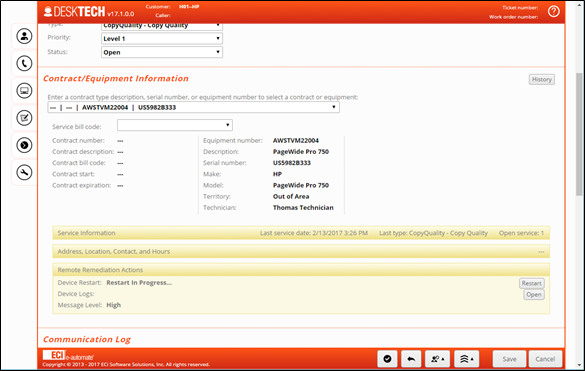
E-automate has partnered with Hewlett Packard (HP) to enable support for the HP Smart Device Services. This support includes the following:
Allow technicians to diagnose before dispatch
Live device status and history will be immediately available for technicians to view.
Restart enabled devices remotely
Technicians will have the ability to request a reboot/restart without having to be onsite with the machine.
Access on demand training
Technicians will be able to access device specific training videos and technical content
Supplies management visibility
Technicians will be able to view supply threshold levels
The above actions will only be available when an enabled device is present.
EnhancementsEnhancements
This release added the following enhancement to existing functionality:
B-34541: As a service manager, when I execute the Service Call Invoice e-view I would like to see the DeskTech technicians instead of the DeskTech queue as the technician.B-34541: As a service manager, when I execute the Service Call Invoice e-view I would like to see the DeskTech technicians instead of the DeskTech queue as the technician.
The actual DeskTech technicians assigned to the service call can now be identified in the Service Call Invoice e-view.
FixesFixes
This release addresses the following issue:
D-32177: After the Chrome browser is closed, if a user reopens the browser and tries to log back into DeskTech an error occurs. If the user logged out of DeskTech prior to closing the browser they are able to log back into DeskTech without error.D-32177: After the Chrome browser is closed, if a user reopens the browser and tries to log back into DeskTech an error occurs. If the user logged out of DeskTech prior to closing the browser they are able to log back into DeskTech without error.
This issue has been resolved so if a user is logged into DeskTech using the Chrome browser and closes the browser without logging out of DeskTech first, they will be able to reopen the browser and log back into DeskTech without an issue.
Digital Quote Manager 17.1
Release FeaturesRelease Features
This is a compatibility release for e-automate version 17.1.
New solutions for DQM are still in progress and are now planned for inclusion in e-automate version 17.2. Warehouse Management Solutions.
EnhancementsEnhancements
New enhancements to existing functionality are still in progress and are now planned for inclusion in e-automate version 17.2. Warehouse Management Solutions.
FixesFixes
Fixes are still in progress and will now be included in e-automate version 17.2. Warehouse Management Solutions.
E-info 17.1
Release FeaturesRelease Features
This release added the following new solution:
B-33660: As an order processor, I want to know when placing an order that the customer (equipment) may not be ready for a new consumable or the quantity being ordered is over and above what might be needed, so that I can adjust the order as needed or research why the customer (equipment) would need the consumables earlier than expected.B-33660: As an order processor, I want to know when placing an order that the customer (equipment) may not be ready for a new consumable or the quantity being ordered is over and above what might be needed, so that I can adjust the order as needed or research why the customer (equipment) would need the consumables earlier than expected.
To support the new solution added to e-automate (See B-33660 under Release Features: e-automate 17.1), users can also enable the Item Yield warning in e-Info through the Customer Gateway Configuration.
When enabled, e-info uses the same logic as e-automate and does not restrict the customer from submitting the order/quote. It will display an indicator on the order “We will review consumable items on your order based on expected and actual usage.” And it will encourage customers to “Please enter order comments to help us understand your request.” For e-info mobile, it will show the order is going to be reviewed based on actual and expected usage but does not display the suggestion to enter order comments.
EnhancementsEnhancements
We are currently evaluating enhancements to existing functionality for future releases.
FixesFixes
This release addresses the following issue:
D-29576: When a service call is created by a customer in e-Info, the technician is receiving multiple duplicate text messages.D-29576: When a service call is created by a customer in e-Info, the technician is receiving multiple duplicate text messages.
This issue was happening on android devices. The text messaging has been corrected and technicians now receive only 1 text message per call created.
D-34131: In e-Info, if a user creates a Service call for an equipment under contract, saves the call and then edits the call, the call will update the bill code from the contract’s bill code to the equipment bill code.D-34131: In e-Info, if a user creates a Service call for an equipment under contract, saves the call and then edits the call, the call will update the bill code from the contract’s bill code to the equipment bill code.
This issue has been resolved so that if a saved service call is edited in e-Info, the bill code on the service call will not change.
Remote Service Manager 17.1
Release FeaturesRelease Features
This is a compatibility release for e-automate version 17.1.
EnhancementsEnhancements
We are currently evaluating enhancements to existing functionality for future releases.
FixesFixes
This release addresses the following issue:
D-32341: When logged into RSM as a manager, if a technician has a call on hold and the manager clicks on the unlock button, clicks on the hold status, reviews releasing hold and new call status, clicks Confirm and clicks Continue the call is staying on hold and not changing status to pending.D-32341: When logged into RSM as a manager, if a technician has a call on hold and the manager clicks on the unlock button, clicks on the hold status, reviews releasing hold and new call status, clicks Confirm and clicks Continue the call is staying on hold and not changing status to pending.
This issue has been corrected and the release process for on hold calls is now working as it should.
Remote Tech 17.1
Release FeaturesRelease Features
This release added the following new solution:
B-32317: As a technician, I want to be able to utilize the HP Smart Device Services so that I have the latest device information available while working on the call.B-32317: As a technician, I want to be able to utilize the HP Smart Device Services so that I have the latest device information available while working on the call.
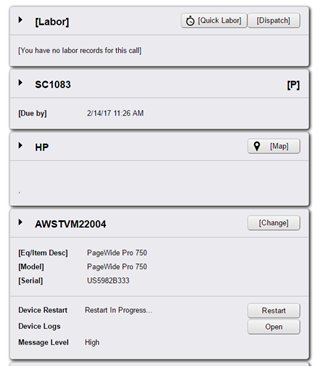
E-automate has partnered with Hewlett Packard (HP) to enable support for the HP Smart Device Services. This support includes the following:
Allow technicians to diagnose before dispatch
Live device status and history will be immediately available for technicians to view.
Restart enabled devices remotely
Technicians will have the ability to request a reboot/restart without having to be onsite with the machine.
Access on demand training
Technicians will be able to access device specific training videos and technical content
Supplies management visibility
Technicians will be able to view supply threshold levels
The above actions will only be available when an enabled device is present.
EnhancementsEnhancements
We are currently evaluating enhancements to existing functionality for future releases.
FixesFixes
This release addresses the following issue:
D-35347: Remote Tech is populating the closed date when setting the status to Pending.D-35347: Remote Tech is populating the closed date when setting the status to Pending.
This issue has been fixed and the closed date will no longer populate for calls with a status of Pending.
Non-supported ReleaseNon-supported Release
©2022 ECI and the ECI logo are registered trademarks of ECI Software Solutions, Inc. All rights reserved.